GROUND IMMUNE Guard
Agent operations get a verdict, never a silent allow.
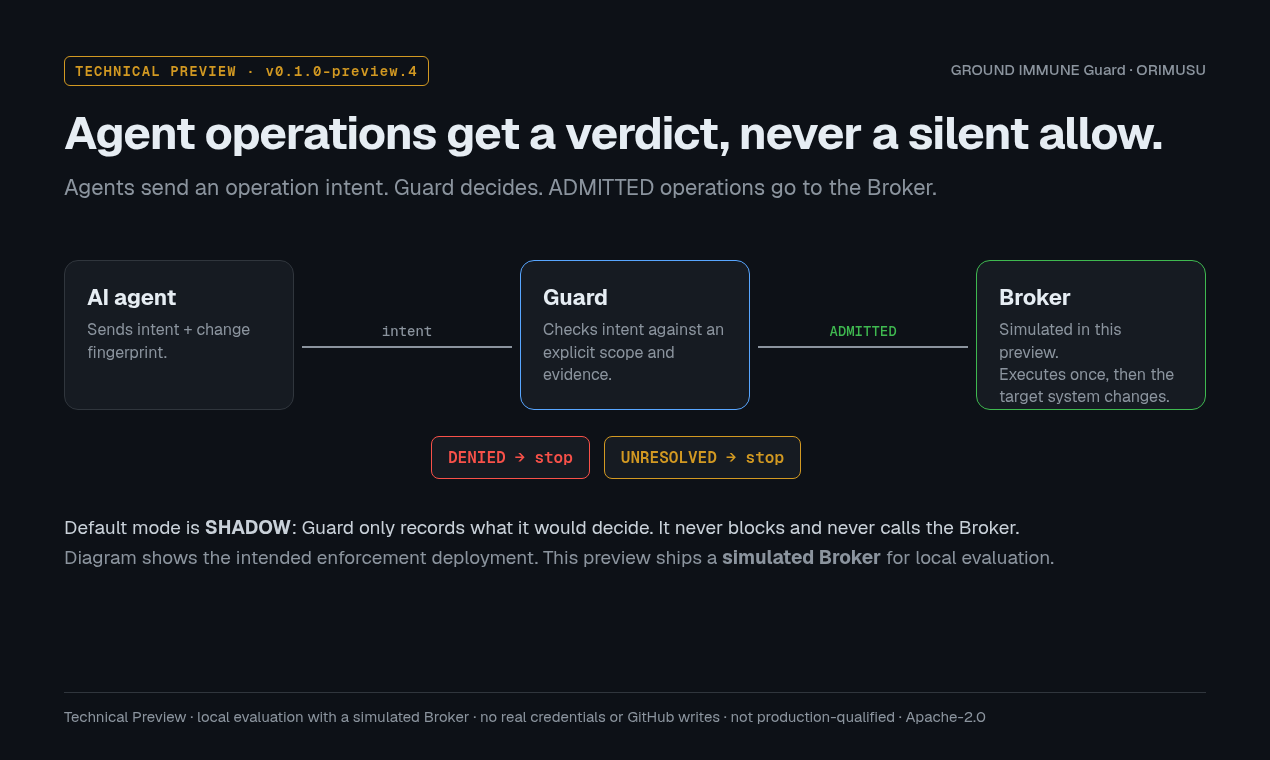
A local scope check for AI-agent operations. An agent submits a proposed operation; Guard checks it against an explicit scope and evidence and returns ADMITTED, DENIED or UNRESOLVED. If evidence is missing, the verdict is UNRESOLVED — never a silent allow.
Coming to Product Hunt on Wednesday, Nov 18, 2026 (00:01 PT / 17:01 JST).
Three verdicts
- ADMITTED
In scope, with the required evidence. Handed to the Broker, which executes it once.
- DENIED
Outside the explicit scope. Not executed.
- UNRESOLVED
Evidence missing, decision reused, or target changed. Not executed — never treated as an allow.
Real CLI output
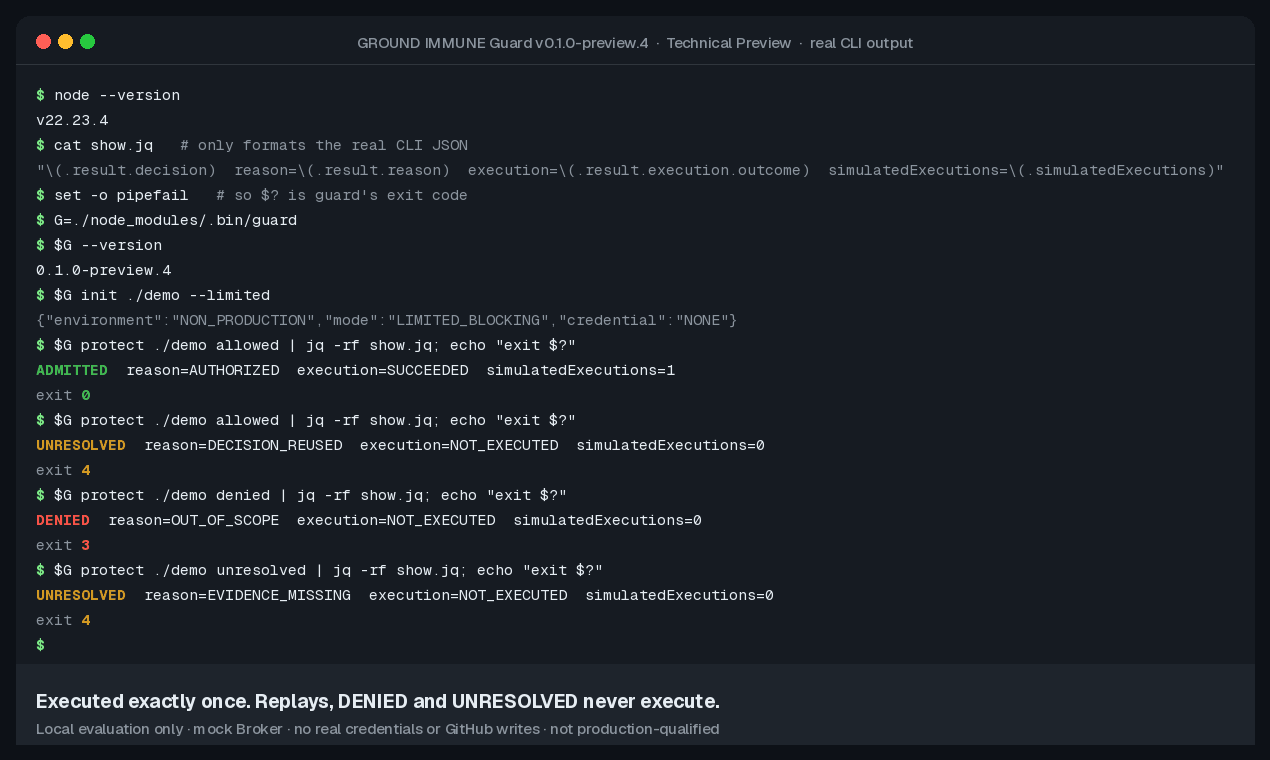
The README commands, run against the v0.1.0-preview.4 tarball in LIMITED_BLOCKING mode with the local simulated Broker. The first allowed operation executes exactly once; the replay, DENIED and UNRESOLVED never execute.
Try it
No account, no credential, no network after download. Requires Node.js 22 or later and npm. Run it in a new, empty directory.
mkdir guard-try && cd guard-try
npm init -y >/dev/null
curl -LO https://github.com/ORIMUSU/ground-immune-guard/releases/download/v0.1.0-preview.4/ground-immune-guard-0.1.0-preview.4.tgz
echo "6bdc758c1059b2e530393e9f9a61706bbb097410ab88afb80adde55668e88168  ground-immune-guard-0.1.0-preview.4.tgz" | sha256sum -c -
npm install --offline --ignore-scripts ./ground-immune-guard-0.1.0-preview.4.tgz

./node_modules/.bin/guard init ./blocking --limited      # local simulated Broker, no credential
./node_modules/.bin/guard protect ./blocking allowed     # ADMITTED   -> executes once (exit 0)
./node_modules/.bin/guard protect ./blocking allowed     # UNRESOLVED -> DECISION_REUSED (exit 4)
./node_modules/.bin/guard protect ./blocking denied      # DENIED     -> OUT_OF_SCOPE (exit 3)
./node_modules/.bin/guard protect ./blocking unresolved  # UNRESOLVED -> EVIDENCE_MISSING (exit 4)
./node_modules/.bin/guard verify ./blocking
Tarball SHA-256
6bdc758c1059b2e530393e9f9a61706bbb097410ab88afb80adde55668e88168
- macOS: use
shasum -a 256 -c -instead ofsha256sum -c -. Windows:(Get-FileHash -Algorithm SHA256 .\ground-immune-guard-0.1.0-preview.4.tgz).Hash, then.\node_modules\.bin\guard.cmd. - Verified on Linux (Node 22 and 24), Windows 11 (Node 24) and macOS on Apple Silicon (Node 24).
- Default mode is SHADOW:
guard init ./shadowrecords what Guard would decide (outcome: OBSERVED) and blocks nothing. - Full walkthrough and Windows notes: README · Quickstart for JavaScript/TypeScript
Changed after admission? Not executed.
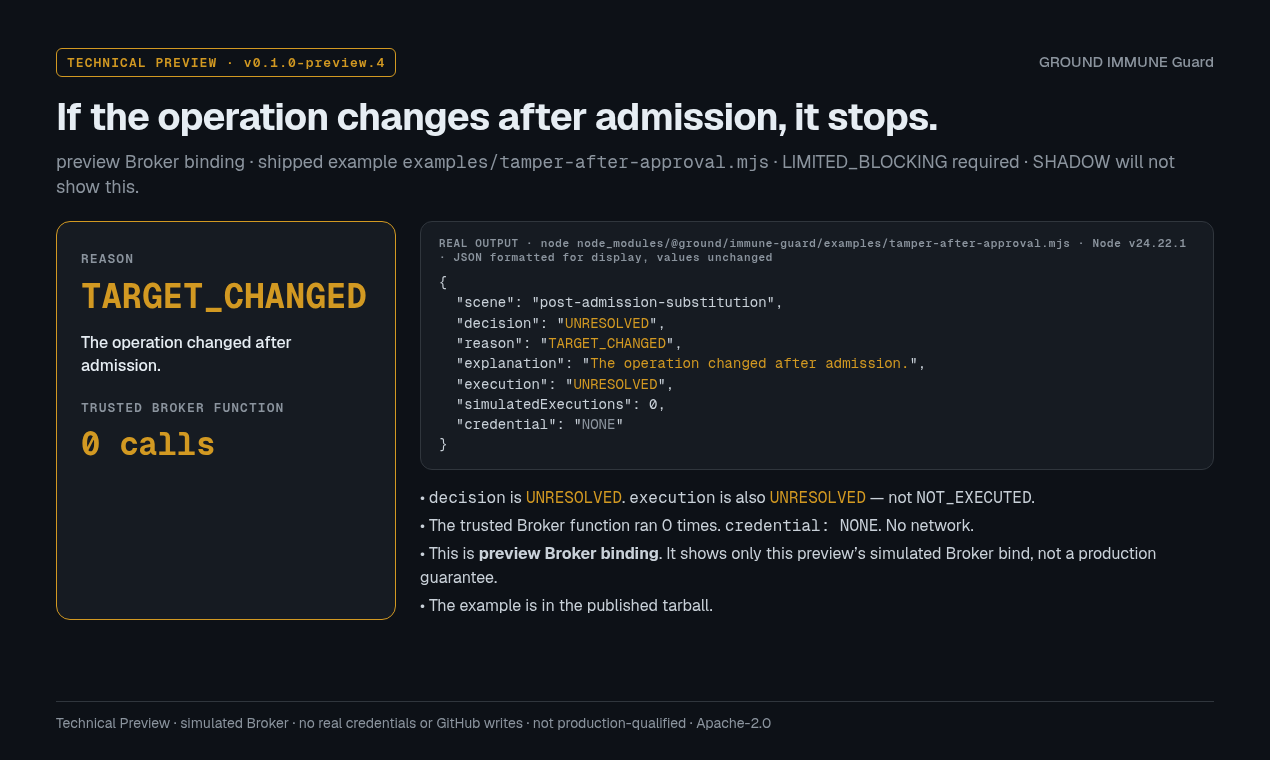
If the operation handed to the Broker is changed after admission, preview Broker binding rejects it: UNRESOLVED / TARGET_CHANGED, and the simulated Broker runs 0 times. This needs LIMITED_BLOCKING; it does not appear in SHADOW. Reproduce it with the shipped example examples/tamper-after-approval.mjs.
How it fits
The agent sends an operation intent. Guard decides. Only ADMITTED operations reach the Broker. The diagram shows the intended enforcement deployment; this preview ships a simulated Broker for local evaluation.
What this preview is, and is not
Included
- Intent evaluation, scope binding and local evidence
- A local CLI and a JavaScript/TypeScript API (preview surface)
- GitHub metadata mapping
- Preview Broker binding that rejects a changed operation after admission (LIMITED_BLOCKING)
- The source used to build the package, under the Apache License 2.0
Not included, not claimed
- Simulated Broker only. No dedicated Broker host, no real credential, no real GitHub write executor.
- Not production-qualified.
- No credential-isolation claim. In-process binding is not process or OS isolation.
- Not published to the npm registry. Install from the GitHub Release tarball, verified by SHA-256 (not cryptographically signed or attested).
Read the Limitations, Threat Model and Security Model before relying on anything here.
Links
- Repository — docs, examples, release recordsgithub.com/ORIMUSU/ground-immune-guard
- Release notes (prerelease)v0.1.0-preview.4
- Release tarballground-immune-guard-0.1.0-preview.4.tgz
- LicenseApache License 2.0
- Security policySECURITY.md
- ChangelogCHANGELOG.md
Contact
Shadow pilots and product questions
immune@orimusu.comRequest a scoped Shadow pilot (one narrowly scoped operation, observed only), or send questions and feedback. See how pilots work. Never send passwords, tokens or keys.
Security reports
security@orimusu.comPlease follow the security policy. Do not file sensitive vulnerability details publicly.